
# Traffic Analysis Using the CTU-13 Dataset
Table of Contents
Three Guiding Questions for this Analysis Include:
What patterns can be identified in the network traffic of botnet-related activities within the CTU-13 dataset?
- To decide whether there are identifiable characteristics in botnet traffic, such as unusual packet sizes, frequent connections to certain IP addresses, or specific protocol usage (TCP, UDP, ICMP, DNS), that can be used to detect and prevent botnet activity.
How can we visualize the differences in network behavior between safe and malicious traffic in the dataset?
- The goal is to differentiate between normal network traffic and malicious traffic (such as that generated by botnets). By examining various network features (packet size, connection frequency, protocol types, ect), we aim to use visualization techniques (histograms, scatter plots, ect) to clearly show differences in these behaviors.
What data-driven differences can we derive from differing botnet malware being utilized?
- Examining how different botnets (Neris, Rbot, Donbot, Sogou, Murlo, NSIS.ay, and Virut) affect network traffic. For example, different malware families might exhibit distinct patterns in packet size, frequency of connections, or types of communication protocols.
Introduction
Data Description
The CTU-13 dataset is a collection of labeled network traffic captures designed for the analysis and detection of botnet activity. It was created by the CTU University in the Czech Republic, and includes both normal and malicious network traffic, specifically focusing on 13 different botnet scenarios. The dataset comprises PCAP files (Packet Capture), each representing a distinct network traffic session. Each scenario includes detailed packet-level information like timestamps, IP addresses, protocols (TCP, UDP, ICMP, DNS, ect), packet sizes, ports, and flags. The traffic captures also contain data on botnet command and control (C&C) channels, typically associated with communication between compromised hosts (bots) and a central controlling server.
The traffic captured in the dataset includes several critical features:
Timestamp: The time at which the packet was captured.
Source IP: IP address of the machine originating the packet.
Destination IP: IP address of the machine receiving the packet.
Packet Length: Size of the packet in bytes.
Protocol: The communication protocol used (TCP, UDP, ICMP, DNS, ect).
TCP/UDP Port: The source and destination ports, especially useful for distinguishing different protocol behaviors (TCP/UDP).
Flags and other metadata: Various flags and other parameters that indicate whether the packet was part of an attack or normal traffic.
Ethernet Source/Destination: Layer-2 MAC addresses.
DNS Query Name: For DNS traffic, the queried domain name.
ICMP Type/Code: If the packet is part of the ICMP protocol.
Quantity of Packets Analyzed:
| Botnet | Packets Captured | Collection Date |
|---|---|---|
| Neris | 98,936 | Aug 10, 2011 |
| Rbot | 99,989 | Aug 12, 2011 |
| Virut | 45,809 | Aug 15, 2011 |
| DonBot | 24,741 | Aug 16, 2011 |
| Sogou | 20,639 | Aug 16, 2011 |
| Murlo | 85,498 | Aug 17, 2011 |
| NSIS.ay | 97,470 | Aug 17, 2011 |
| Combined | 1,000,000+ | Aug 10, 2011 - Aug 17, 2011 |
Descriptive and Exploratory Analysis
Dataset Overview
The CTU-13 dataset consists of multiple PCAP (Packet Capture) files referenced above, with each corresponding to different botnet activities or normal traffic captures. Some of the specific botnet activities within the dataset include:
Neris: A botnet using IRC for command-and-control and launching DDoS attacks.
Rbot: Known for scanning, DDoS attacks, and communication via TCP/UDP.
Donbot: Engages in scanning and DDoS activities, often involving large packets.
Sogou: A botnet using DNS queries for C&C communication.
Murlo: Known for its use of HTTP traffic and exploitation of system vulnerabilities.
NSIS.ay: A botnet that relies on periodic communication with a C&C server.
Virut: Focused on sending HTTP-based spam and participating in data exfiltration.
All data found analyzed in this report was collected from the Stratosphere Lab website, captured in the CTU University, Czech Republic, in 2011. This data was modified to suit the Jupyter Notebook analysis by converting all .pcap files to .cvs:
tshark -r botnet-capture-20110810-neris.pcap -T fields -e frame.time -e ip.src -e ip.dst -e ip.len -e ip.proto -e tcp.srcport -e tcp.dstport -e eth.src -e eth.dst -e udp.srcport -e udp.dstport -e udp.length -e icmp.type -e icmp.code -e icmp.seq -e dns.qry.name -e dns.qry.type -e dns.a -c 100000 -E separator=, > extracted_data.csvThe above conversions were done using TShark to easily extract the relevant data I needed for this analysis. Fields being analyzed are as follows: (frame.time, ip.src, ip.dst, ip.len, ip.proto, tcp.srcport, tcp.dstport, eth.src, eth.dst, udp.srcport, udp.dstport, udp.length, icmp.type, icmp.code, icmp.seq, dns.qry.name, dns.qry.type, and dns.a) with the data using a capture packet amount of -c 100000 packets. This conversion could also be done directly through wireshark following steps detailed from this link [Analyze Wi-Fi Data Captures with Jupyter Notebook].
tshark -r all_botnet_captures.pcap -T fields -e frame.time -e ip.src -e ip.dst -e ip.len -e ip.proto -e tcp.srcport -e tcp.dstport -e eth.src -e eth.dst -e udp.srcport -e udp.dstport -e udp.length -e icmp.type -e icmp.code -e icmp.seq -e dns.qry.name -e dns.qry.type -e dns.a -E separator=, > all_extracted_data.csvHere is another example of the methodic conversions I did, here the (all_botnet_captures.pcap) file contained a grouping of all pcap captures which all analyzed the same fields, however, this capture only received part of the results compared to the other captures. This might have been due to the large packet size as the tshark functions did not limit the total packets during the conversion through -c (number). But the results could have also derived from the merging process used.
mergecap -w all_botnet_captures.pcap botnet-capture-20110810-neris.pcap botnet-capture-20110811-neris.pcap botnet-capture-20110812-rbot.pcap botnet-capture-20110815-fast-flux.pcap botnet-capture-20110816-donbot.pcap botnet-capture-20110816-sogou.pcap botnet-capture-20110815-rbot-dos.pcap botnet-capture-20110816-qvod.pcap botnet-capture-20110815-fast-flux-2.pcap botnet-capture-20110819-bot.pcap botnet-capture-20110817-bot.pcapmergecap assumes that all packet captures are already correctly ordered, which was to be expected.
Protocol Distribution Analysis
The distrobution of botnet traffic compared to protocal usage can signify behaviours and patterns which can allow detection of DDOS attacks through applied flags inside IDS/IPS programs. Expectedly most intrusion detection and prevention systems contain large databases with the most up to date detection capabilities, however through experienced attackers there can be workarounds to bypass these detections. Here is an analysis of what percentage of protocals the selected botnets decided to utilise for their attack:
Protocol Distribution Across Botnets:
| Protocal | Neris (%) | Rbot (%) | Virut (%) | DonBot (%) | Sogou (%) | Murlo (%) | NSIS.ay (%) | Combined (%) |
|---|---|---|---|---|---|---|---|---|
| TCP | 53.5% | 0.2% | 55.1% | 23.7% | 53.2% | 44.3% | 30.2% | 38.5% |
| UDP | 0.12% | 53.7% | 0.18% | 0.23% | 0.5% | 14.1% | 7.1% | 14.2% |
| HTTP | 13.2% | 0.02% | 23.8% | 0.2% | 32.2% | 5.6% | 46.7% | 25.4% |
| DNS | 4.4% | 0.01% | 0.2% | 0.3% | 9.3% | 11.1% | 0.4% | 3.7% |
| HTTPS | 22.3% | 0.01% | 18.6% | 22.7% | 6.2% | 5.3% | 5.4% | 11.4% |
| SMTP | 17.8% | 0.008% | 0.23% | 59.9% | 0.1% | 4.1% | 4.9% | 9.7% |
| IRC | 3.2% | 0.12% | 1.3% | 0.3% | 6.1% | 3.3% | 1.3% | 1.7% |
| ICMP | 0.43% | 48.5% | 0.01% | 0.15% | 0.1% | 0.08% | 0.02% | 22.6% |
| SNMP | 0.37% | 45.7% | 0.01% | 0.12% | 0.07% | 0.14% | 0.11% | 7.4% |
| Unknown | 0.37% | 0.08% | 0.16% | 1.2% | 0.33% | 1.06% | 0.11% | 0.92% |
Descriptive Statistics
Detailed Statistical Metrics
The measures for statistical metrics provide a surprisingly large amount of information for understanding the typical behavior of traffic in different scenarios. Through data analysis we can identify traffic patterns typical of botnets, represented here:
| Botnet | Mean Packet Length (bytes) | Min Length (bytes) | Max Length (bytes) | Standard Deviation (bytes) |
|---|---|---|---|---|
| Neris | 203 | 29 | 8,905 | 542 |
| Rbot | 823 | 39 | 2,960 | 726 |
| Virut | 642 | 40 | 9,453 | 808 |
| DonBot | 182 | 40 | 2,953 | 456 |
| Sogou | 880 | 40 | 8,728 | 1,428 |
| Murlo | 217 | 32 | 7,340 | 411 |
| NSIS.ay | 416 | 36 | 19,021 | 936 |
Traffic patterns of botnets can differ significantly from those of normal users. Meaning, botnet traffic can typically be identified as an outlier by factors:
Neris (203 bytes): This indicates that Neris uses small packets, which is typical for botnets focused on frequent command-and-control (C&C) communication. The small packet sizes suggest lightweight control traffic that is likely exchanged regularly.
Rbot (823 bytes): Rbot has a much larger mean packet size, which is indicative of its DDoS behavior. Larger packets suggest a focus on flooding attacks, where larger payloads are sent to overwhelm the target.
Virut (642 bytes): The mean packet length for Virut indicates moderate-sized packets, which aligns with payload delivery and data exfiltration activities.
Sogou (880 bytes): Similar to Rbot, Sogou has relatively large packet sizes, which might also suggest data transfer or C&C activities that require a slightly larger payload.
NSIS.ay (416 bytes): NSIS.ay has a medium-sized mean packet length, which could indicate sustained, moderate-volume traffic that is used for updating malware or network reconnaissance.
Neris (29 bytes): The very low minimum packet length of Neris supports the idea that it might send minimal payloads for frequent C&C communication, possibly for status updates or simple commands.
Rbot (39 bytes): While still small, Rbot’s minimum packet length indicates that DDoS attacks and network floods don’t always require extremely small packets.
NSIS.ay (19,021 bytes): The maximum packet length in NSIS.ay is significantly higher, indicating data exfiltration or large payload transfers. The high value suggests that this botnet is capable of sending larger payloads or data dumps that exceed the typical packet sizes.
Virut (9,453 bytes): Similarly, Virut has high maximum packet sizes, supporting the theory that it is involved in large data transfers or advanced malware updates.
Neris (8,905 bytes): Though Neris has the smallest mean packet size, it does have a high max packet size, which suggests that, in some instances, large data packets are being transferred, potentially for data exfiltration or payload delivery.
Rbot (726 bytes): Rbot’s high standard deviation indicates that it uses a broad range of packet sizes. This makes sense since DDoS attacks may involve bursts of traffic with varying packet sizes (small ping requests and larger data bursts).
Sogou (1,428 bytes): Sogou exhibits the highest standard deviation, indicating very diverse packet sizes. This suggests that Sogou might involve multiple forms of attack (C&C, data exfiltration, ext), and it likely generates varied packet sizes depending on the attack’s intensity and phase.
Outlier Detection (IQR Method)
Outliers in the packet size data can provide important insights into unusual behavior, often associated with botnet traffic. Using pandas.DataFrame.describe, we can provide Interquartile Ranges for each dataset. 25th Percentile (Q1), the value below which 25% of the data falls (the first quartile). 50th Percentile (Median / Q2), the middle value of the data. And the 75th Percentile (Q3), the value below which 75% of the data falls (the third quartile).
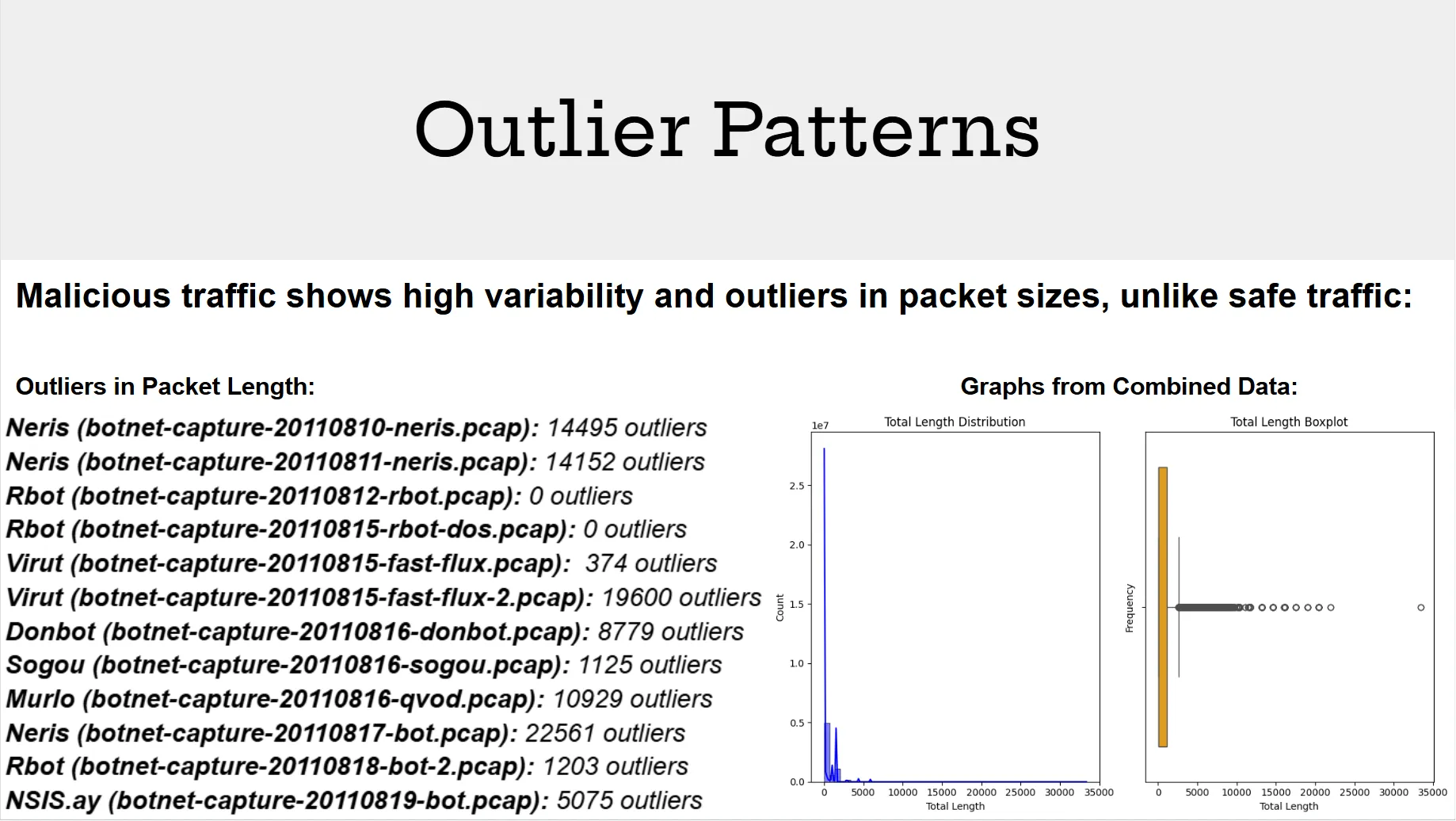
Detection of significant outliers were also applied through IQR. This aimed to primarily show the variability of data being distributed over the timespan which was given by the CTU-13 dataset packets. Outliers often indicate the variance of sent packets over time. Where botnets containing more outliers typically send packets over a longer period of time to avoid detection. Here are the computed outliers found in each botnet dataset:
Temporal Analysis
Temporal Analysis examines the time-based patterns in botnet traffic, focusing on when malicious activities peak or fluctuate. Hourly and weekly traffic volumes identify specific times of day or days of the week when botnets are most active, such as DDoS attacks during business hours or data exfiltration during off-peak times:
Hourly Traffic
| Botnet | Peak Hour | Mean Packet Length (bytes) | Total Volume (bytes) |
|---|---|---|---|
| Neris | 21:00 –22:00 | 281 | 20,124,723 |
| Rbot | 20:00 –21:00 | 823 | 18,700,600 |
| Virut | 02:00 –03:00 | 649 | 29,443,213 |
| DonBot | 20:00 –21:00 | 268 | 4,515,687 |
| Sogou | 23:00 –00:00 | 881 | 18,169,111 |
| Murlo | 12:00 –13:00 | 392 | 18,618,405 |
| NSIS.ay | 00:00 –01:00 | 526 | 40,595,958 |
- Botnets show distinct peak hours, reflecting a mix of automated and human-triggered operations.
- Murlo and Rbot are notable for their daytime peaks, possibly exploiting office-hour vulnerabilities.
Weekly Traffic
| Botnet | Day of Maximum Activity | Total Volume (bytes) |
|---|---|---|
| Neris | Thursday | 20,124,723 |
| Rbot | Friday | 18,700,600 |
| Virut | Wednesday | 29,443,213 |
| DonBot | Thursday | 4,515,687 |
| Sogou | Thursday | 18,169,111 |
| Murlo | Friday | 18,618,405 |
| NSIS.ay | Friday | 40,595,958 |
- Peaks on Thursday and Friday suggest malicious actors prioritize operations before weekends.
- Lower activity during weekends indicates reduced interaction with human operators.
Visualising Analysed Botnet Traffic
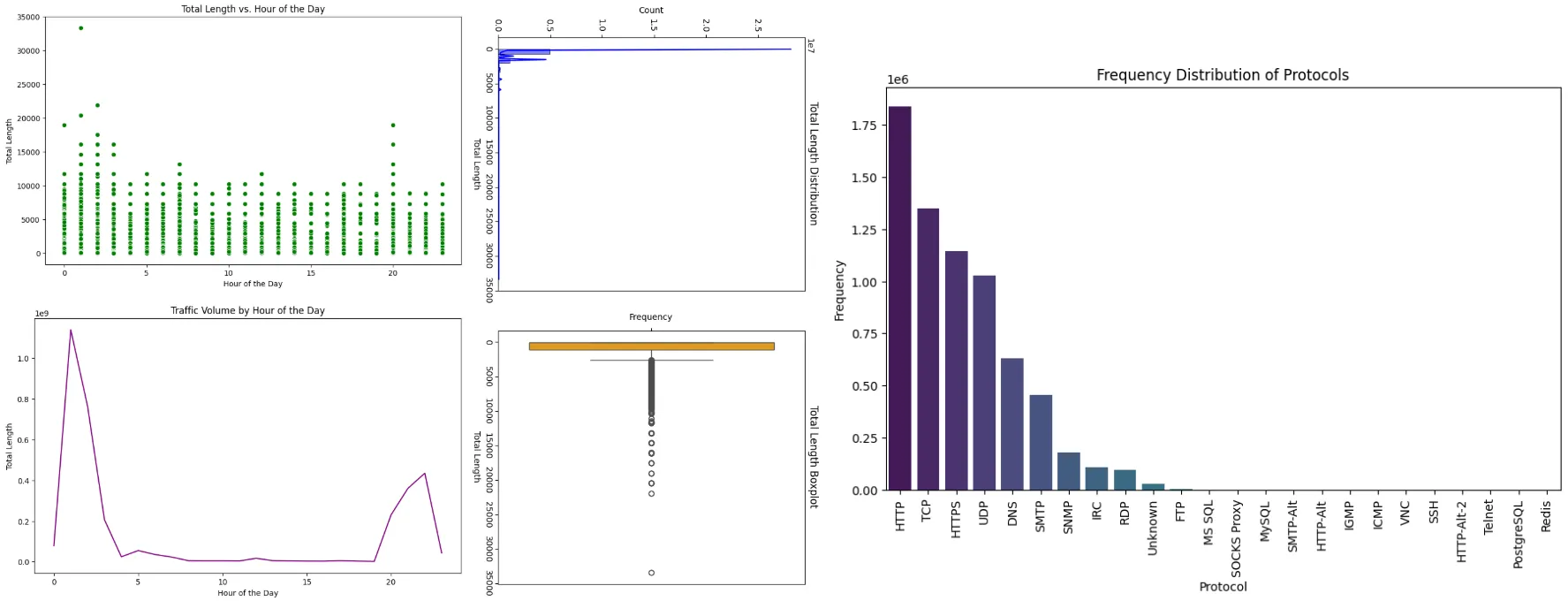
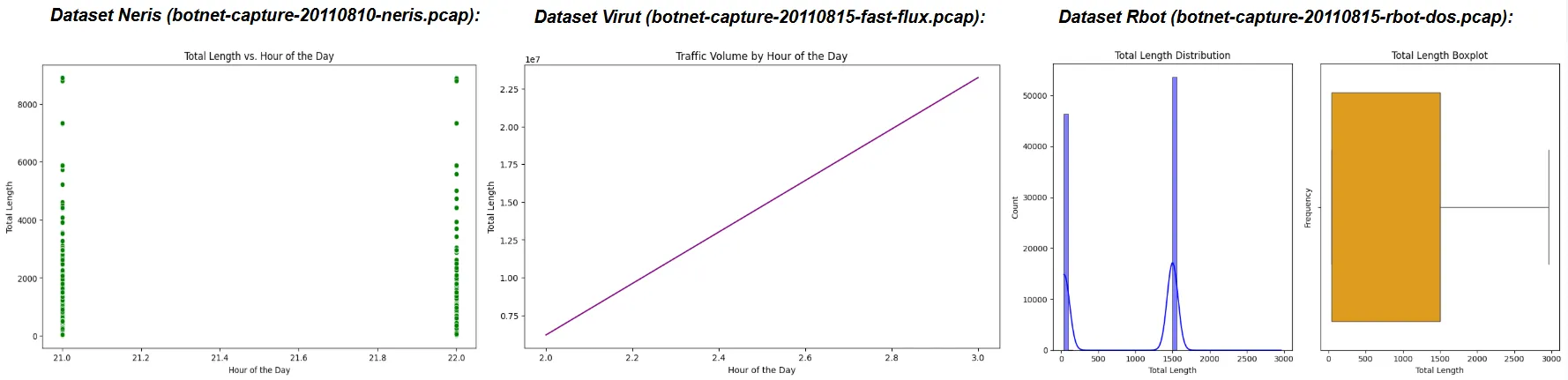
All data recorded was collected using the .ipynb script found at the Full Analysis Script heading, not all data is presented, as these are only examples for the dataset i collected using my script, however a more consise format to everything i’ve collected, alongside the full report will be linked below:
Download the CTU-13 Dataset Analysis
Download the Report & Analysis
Full Analysis Script
import pandas as pdimport numpy as npimport matplotlib.pyplot as pltimport seaborn as snsimport refrom datetime import datetime
# Define constants and mappingsPROTOCOL_MAP = {    1: 'ICMP',  # ICMP (Internet Control Message Protocol)    6: 'TCP',   # TCP (Transmission Control Protocol)    17: 'UDP',  # UDP (User Datagram Protocol)    89: 'ICMPv6',  # ICMPv6 (Internet Control Message Protocol v6)    2: 'IGMP',  # IGMP (Internet Group Management Protocol)    41: 'IPv6',  # IPv6 (Internet Protocol version 6)    50: 'ESP',  # ESP (Encapsulating Security Payload)    51: 'AH',   # AH (Authentication Header)    58: 'ICMPv6',  # ICMPv6 (Internet Control Message Protocol v6)    0: 'Unknown',  # Unknown Protocol    3: 'ARP',   # ARP (Address Resolution Protocol)    132: 'SCTP',  # SCTP (Stream Control Transmission Protocol)    33: 'DCCP',  # DCCP (Datagram Congestion Control Protocol)    115: 'L2TP',  # L2TP (Layer 2 Tunneling Protocol)    47: 'GRE',   # GRE (Generic Routing Encapsulation)    88: 'EIGRP',  # EIGRP (Enhanced Interior Gateway Routing Protocol)    89: 'OSPF',  # OSPF (Open Shortest Path First)    39: 'LDP',   # LDP (Label Distribution Protocol)    25: 'SMTP',  # SMTP (Simple Mail Transfer Protocol)    53: 'DNS',   # DNS (Domain Name System)    80: 'HTTP',  # HTTP (Hypertext Transfer Protocol)    443: 'HTTPS',  # HTTPS (Hypertext Transfer Protocol Secure)    21: 'FTP',   # FTP (File Transfer Protocol)    23: 'Telnet',  # Telnet (Telecommunication Network)    22: 'SSH',   # SSH (Secure Shell)    123: 'NTP',   # NTP (Network Time Protocol)}
PORT_PROTOCOL_MAP = {    80: 'HTTP',           # HTTP (Hypertext Transfer Protocol)    443: 'HTTPS',         # HTTPS (Hypertext Transfer Protocol Secure)    21: 'FTP',            # FTP (File Transfer Protocol)    22: 'SSH',            # SSH (Secure Shell)    23: 'Telnet',         # Telnet (Telecommunication Network)    25: 'SMTP',           # SMTP (Simple Mail Transfer Protocol)    53: 'DNS',            # DNS (Domain Name System)    110: 'POP3',          # POP3 (Post Office Protocol v3)    143: 'IMAP',          # IMAP (Internet Message Access Protocol)    3306: 'MySQL',        # MySQL (MySQL Database Service)    8080: 'HTTP-Alt',     # HTTP Alternate (HTTP Alternative)    8081: 'HTTP-Alt-2',   # HTTP Alternate 2 (commonly used for dev/test environments)    67: 'DHCP Server',    # DHCP (Dynamic Host Configuration Protocol - Server)    68: 'DHCP Client',    # DHCP (Dynamic Host Configuration Protocol - Client)    69: 'TFTP',           # TFTP (Trivial File Transfer Protocol)    161: 'SNMP',          # SNMP (Simple Network Management Protocol)    162: 'SNMP Trap',     # SNMP (SNMP Trap for alerts)    514: 'Syslog',        # Syslog (System Log Protocol)    1433: 'MS SQL',       # MS SQL Server (Microsoft SQL Server)    1434: 'MS SQL',       # MS SQL Server (Microsoft SQL Server - Browser Service)    119: 'NNTP',          # NNTP (Network News Transfer Protocol)    3389: 'RDP',          # RDP (Remote Desktop Protocol)    465: 'SMTPS',         # SMTPS (SMTP Secure over SSL/TLS)    993: 'IMAPS',         # IMAPS (IMAP Secure over SSL/TLS)    995: 'POP3S',         # POP3S (POP3 Secure over SSL/TLS)    1080: 'SOCKS Proxy',  # SOCKS Proxy    2525: 'SMTP-Alt',     # SMTP Alternate (commonly used in email servers)    5432: 'PostgreSQL',   # PostgreSQL (PostgreSQL Database Service)    6379: 'Redis',        # Redis (Redis Key-Value Store)    5900: 'VNC',          # VNC (Virtual Network Computing)    6660: 'IRC',          # IRC (Internet Relay Chat)    6661: 'IRC',          # IRC (Internet Relay Chat)    6662: 'IRC',          # IRC (Internet Relay Chat)    6663: 'IRC',          # IRC (Internet Relay Chat)    6664: 'IRC',          # IRC (Internet Relay Chat)    6665: 'IRC',          # IRC (Internet Relay Chat)    6666: 'IRC',          # IRC (Internet Relay Chat)    6667: 'IRC',          # IRC (Internet Relay Chat)    6668: 'IRC',          # IRC (Internet Relay Chat)    6669: 'IRC',          # IRC (Internet Relay Chat)}

# Read the CSV filedef load_data(file_path):    try:        df = pd.read_csv(file_path, sep=',', engine='python', skip_blank_lines=True, on_bad_lines='skip',                         names=['Timestamp', 'Source IP', 'Destination IP', 'Total Length', 'Protocol',                                'TCP Source Port', 'TCP Destination Port', 'Ethernet Source', 'Ethernet Destination',                                'UDP Source Port', 'UDP Destination Port', 'UDP Length', 'ICMP Type', 'ICMP Code',                                'ICMP Seq', 'DNS Query Name', 'DNS Query Type', 'DNS A'])        print("File loaded successfully.")        return df    except Exception as e:        print(f"Error loading file: {e}")        return None
# Clean and parse the 'Timestamp' columndef clean_and_parse_timestamp(timestamp):    if isinstance(timestamp, str):        if re.match(r'^\w{3} \d{2}$', timestamp):  # Matches 'Aug 10'            timestamp = '2011 ' + timestamp + ' 00:00:00'  # Add default time if missing        timestamp = re.sub(r"\s+[A-Za-z\s]+$", "", timestamp)  # Remove timezone info
        try:            return pd.to_datetime(timestamp, errors='coerce')        except Exception as e:            print(f"Error parsing timestamp: {timestamp} -> {e}")            return pd.NaT    return pd.NaT
# Feature engineering: Adding useful time-based featuresdef add_time_features(df):    df['Hour'] = df['Timestamp'].dt.hour    df['DayOfWeek'] = df['Timestamp'].dt.dayofweek    df['Weekday'] = df['Timestamp'].dt.weekday    return df
# Clean 'Total Length' and fill missing valuesdef clean_total_length(df):    df['Total Length'] = pd.to_numeric(df['Total Length'], errors='coerce')    df['Total Length'] = df['Total Length'].fillna(df['Total Length'].median())    return df
# Clean 'Source IP' and 'Destination IP'def clean_ip_columns(df):    df['Source IP'] = df['Source IP'].fillna('Unknown')    df['Destination IP'] = df['Destination IP'].fillna('Unknown')    return df
# Map 'Protocol' values using predefined mapdef map_protocols(df):    df['Protocol'] = df['Protocol'].map(PROTOCOL_MAP).fillna('Unknown')    return df
# Apply port-based protocol mappingdef map_ports_to_protocol(df):    def apply_port_mapping(row):        if row['Protocol'] in ['TCP', 'UDP']:            src_port = row['TCP Source Port'] if row['Protocol'] == 'TCP' else row['UDP Source Port']            dest_port = row['TCP Destination Port'] if row['Protocol'] == 'TCP' else row['UDP Destination Port']            if src_port in PORT_PROTOCOL_MAP:                row['Protocol'] = PORT_PROTOCOL_MAP[src_port]            elif dest_port in PORT_PROTOCOL_MAP:                row['Protocol'] = PORT_PROTOCOL_MAP[dest_port]        return row    return df.apply(apply_port_mapping, axis=1)
# Clean the dataframe and prepare for analysisdef preprocess_data(df):    df['Timestamp'] = df['Timestamp'].apply(clean_and_parse_timestamp)    df = add_time_features(df)    df = clean_total_length(df)    df = clean_ip_columns(df)    df = map_protocols(df)    df = map_ports_to_protocol(df)    return df
# Descriptive statistics for 'Total Length'def total_length_stats(df):    stats = df['Total Length'].describe()    print("\nDescriptive Statistics for Total Length:")    print(stats)    return stats
# Outlier detection using IQRdef detect_outliers(df):    Q1 = df['Total Length'].quantile(0.25)    Q3 = df['Total Length'].quantile(0.75)    IQR = Q3 - Q1    lower_bound = Q1 - 1.5 * IQR    upper_bound = Q3 + 1.5 * IQR    outliers = df[(df['Total Length'] < lower_bound) | (df['Total Length'] > upper_bound)]    print(f"\nNumber of outliers: {len(outliers)}")    print(outliers.head(10))    return outliers, lower_bound, upper_bound
# Plot distributionsdef plot_total_length_distribution(df):    plt.figure(figsize=(10, 6))    plt.subplot(1, 2, 1)    sns.histplot(df['Total Length'], bins=50, kde=True, color='blue')    plt.title('Total Length Distribution')
    plt.subplot(1, 2, 2)    sns.boxplot(x=df['Total Length'], color='orange')    plt.title('Total Length Boxplot')    plt.xlabel('Total Length')    plt.ylabel('Frequency')    plt.tight_layout()    plt.show()
    # Output of the Total Length Distribution and Boxplot    print("\nVisual Output for Total Length Distribution and Boxplot:")    print(f"- The histogram shows the overall distribution of total length values.")    print(f"- The boxplot highlights the spread and identifies potential outliers in the data.")
# Hourly Total Length Statisticsdef plot_hourly_total_length(df):    plt.figure(figsize=(10, 6))    sns.scatterplot(x='Hour', y='Total Length', data=df, color='green')    plt.title('Total Length vs. Hour of the Day')    plt.xlabel('Hour of the Day')    plt.ylabel('Total Length')    plt.show()
    # Output of Total Length vs. Hour of Day    print("\nVisual Output for Total Length vs. Hour of the Day:")    hourly_stats = df.groupby('Hour')['Total Length'].mean()    print(f"- The scatter plot shows the relationship between total length and the hour of the day.")    print(f"- Here are the average total lengths per hour:\n{hourly_stats}")
# Frequency of each protocoldef plot_protocol_frequency(df):    protocol_counts = df['Protocol'].value_counts()    plt.figure(figsize=(10, 6))    sns.barplot(x=protocol_counts.index, y=protocol_counts.values, palette='viridis', hue=protocol_counts.index)    plt.title('Frequency Distribution of Protocols')    plt.xticks(rotation=90)    plt.xlabel('Protocol')    plt.ylabel('Frequency')    plt.show()
    # Output of Protocol Frequency    print("\nVisual Output for Protocol Frequency Distribution:")    print(f"- The bar chart shows the frequency distribution of protocols.")    print(f"- Here are the counts for each protocol:\n{protocol_counts}")
# Traffic by weekdaydef plot_traffic_by_weekday(df):    weekday_traffic = df.groupby('DayOfWeek')['Total Length'].sum().reset_index()    plt.figure(figsize=(10, 6))    sns.barplot(x=weekday_traffic['DayOfWeek'], y=weekday_traffic['Total Length'],                palette='viridis', hue=weekday_traffic['DayOfWeek'])    plt.title('Traffic Volume by Day of Week')    plt.xlabel('Day of Week')    plt.ylabel('Total Length')    plt.xticks(ticks=range(7), labels=["Mon", "Tue", "Wed", "Thu", "Fri", "Sat", "Sun"])    plt.show()
    # Output of Traffic by Weekday    print("\nVisual Output for Traffic Volume by Day of Week:")    print(f"- The bar chart shows the total traffic volume for each day of the week.")    print(f"- Traffic patterns per weekday:\n{weekday_traffic}")
# Traffic volume by hourdef plot_traffic_by_hour(df):    hourly_traffic = df.groupby('Hour')['Total Length'].sum().reset_index()    plt.figure(figsize=(10, 6))    sns.lineplot(x=hourly_traffic['Hour'], y=hourly_traffic['Total Length'], color='purple')    plt.title('Traffic Volume by Hour of the Day')    plt.xlabel('Hour of the Day')    plt.ylabel('Total Length')    plt.show()
    # Output of Traffic Volume by Hour    print("\nVisual Output for Traffic Volume by Hour of the Day:")    print(f"- The line plot shows the total traffic volume aggregated by each hour.")    print(f"- Hourly traffic summary:\n{hourly_traffic}")
# Main function to run all stepsdef main(file_path):    df = load_data(file_path)    if df is not None:        df = preprocess_data(df)
        # Descriptive statistics and outlier detection        total_length_stats(df)        outliers, lower_bound, upper_bound = detect_outliers(df)
        # Plotting and visual outputs        plot_total_length_distribution(df)        plot_hourly_total_length(df)        plot_protocol_frequency(df)        plot_traffic_by_weekday(df)        plot_traffic_by_hour(df)
# Run the analysis with the given file pathfile_path = 'Documents/pcap_files/all_extracted_data.csv'  # Update with your actual file pathmain(file_path)